To make a running server-application a way more professional we can not just write our own log about what is going good or bad. We can go instead and use windows events. In the following example I will write a Windows-Event in a created event-source. By doing this I can separate all the events that I will throw out in my applications from the other event-messages and errors of the other applications.
class Program
{
   const string APP_SOURCE = "LiveCodeBlog";

   static void Main(string[] args)
   {
      EventLog.CreateEventSource(APP_SOURCE , APP_SOURCE);

      EventLog myLog = new EventLog
      {
         Source = APP_SOURCE
      };

      myLog.WriteEntry("Writing to event log with the source " + APP_SOURCE);

   }
}
The final result looks like this:
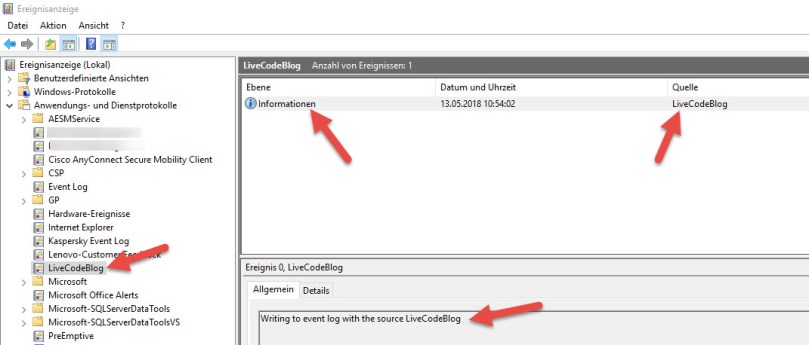
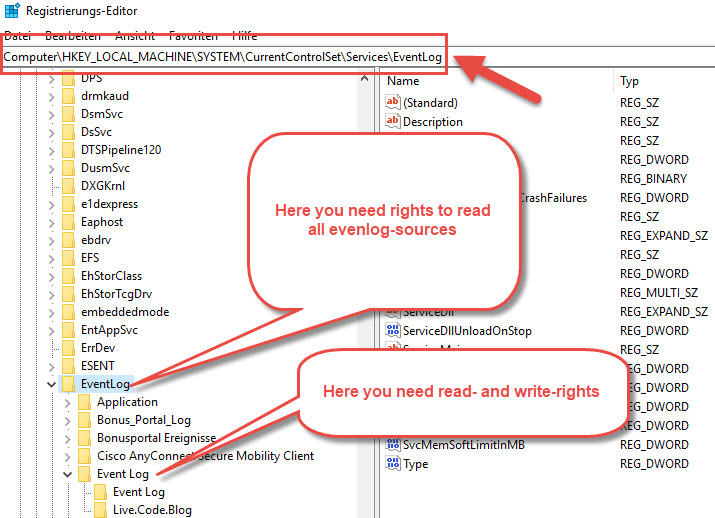
However to create a event-source you need to have the rights to do this. Exactly you need full-rights to create the even-source and as well read-rights for all other event sources. This is because .Net wants to check if there is another eventsource named like this. So you can check your right like this:
 live.code.blog()
You must be logged in to post a comment.